



We’re excited to introduce a brand-new view in Sotrender – Detailed post analysis – where you’ll find in-depth statistics for your TikTok videos. Beyond the metrics you already had, you’ll now get access to new insights, plus a timeline view showing how those numbers evolved over time.
How to Use More TikTok Content Data
Analytics data can be used to create a more effective, data-driven content strategy by identifying trends, audience preferences, and opportunities for engagement.
Deeper insights into your published TikTok videos, including analysis of the total number of content published and different types of posts, are a goldmine for understanding campaign effectiveness and audience preferences on this platform.
Here’s how you can use them for business and strategy:
- Evaluate ROI – Compare the performance of spontaneous videos versus high-production studio shoots by tracking engagements and the total number of videos posted, and make data-driven decisions about future content. Using analytics tools can further help evaluate content effectiveness and inform your strategy.
- Choose the most effective formats – Identify which videos spark more engagement or sustain views longer.
- Understand what works in each video – See which elements improve retention or drive likes, and reuse them in future productions.
- Pick the right videos for paid promotion – Select your top performing posts, especially those with strong organic retention or conversions, as candidates for an ad boost, because they’ve already proven themselves.
- See how videos impact community growth – Find out which posts bring in new followers and which build loyalty (measured by a higher percentage of views from existing followers).
Where to Find Detailed Post Analysis
To access post details, make sure you are logged into Sotrender, go to the Content tab, and open Top Posts. Then simply click Detailed post analysis next to the thumbnail of the video you want to analyze. This section shows key metrics and analytics data for each post.
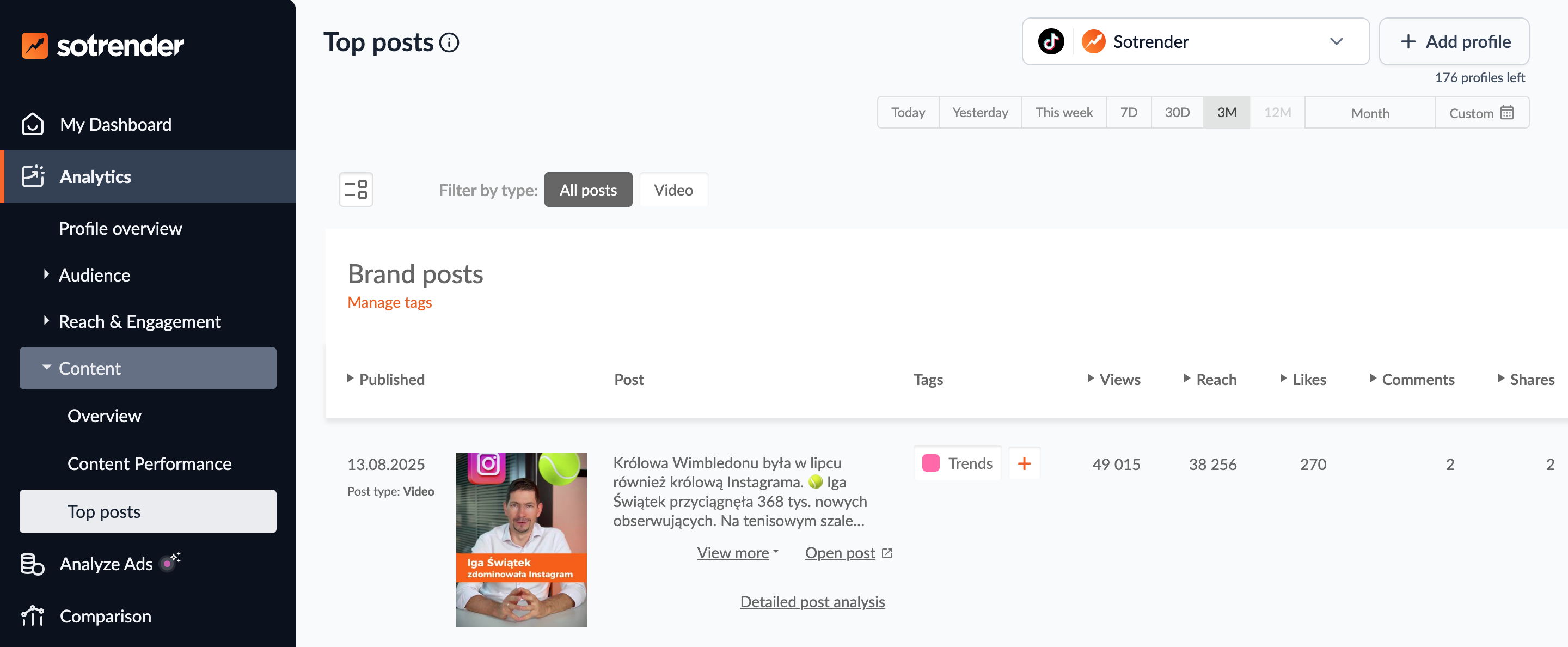
What data will you find in a detailed post analysis?
Monitor Your Data Over Time
Until now, TikTok analytics in Sotrender mostly showed you cumulative numbers, like the total likes or comments on a video. You could not compare these metrics across different time periods, as the total followers count remains static regardless of the time periods selected.
From now on, you can also analyze how these metrics are distributed over time. You can select a custom range, analyze data from the past seven days, or choose a specific period to get more flexible and detailed insights.
This way, you’ll see which videos generate views and engagement only in the first few hours (or days), and which ones keep performing steadily and continue bringing results even after several days.
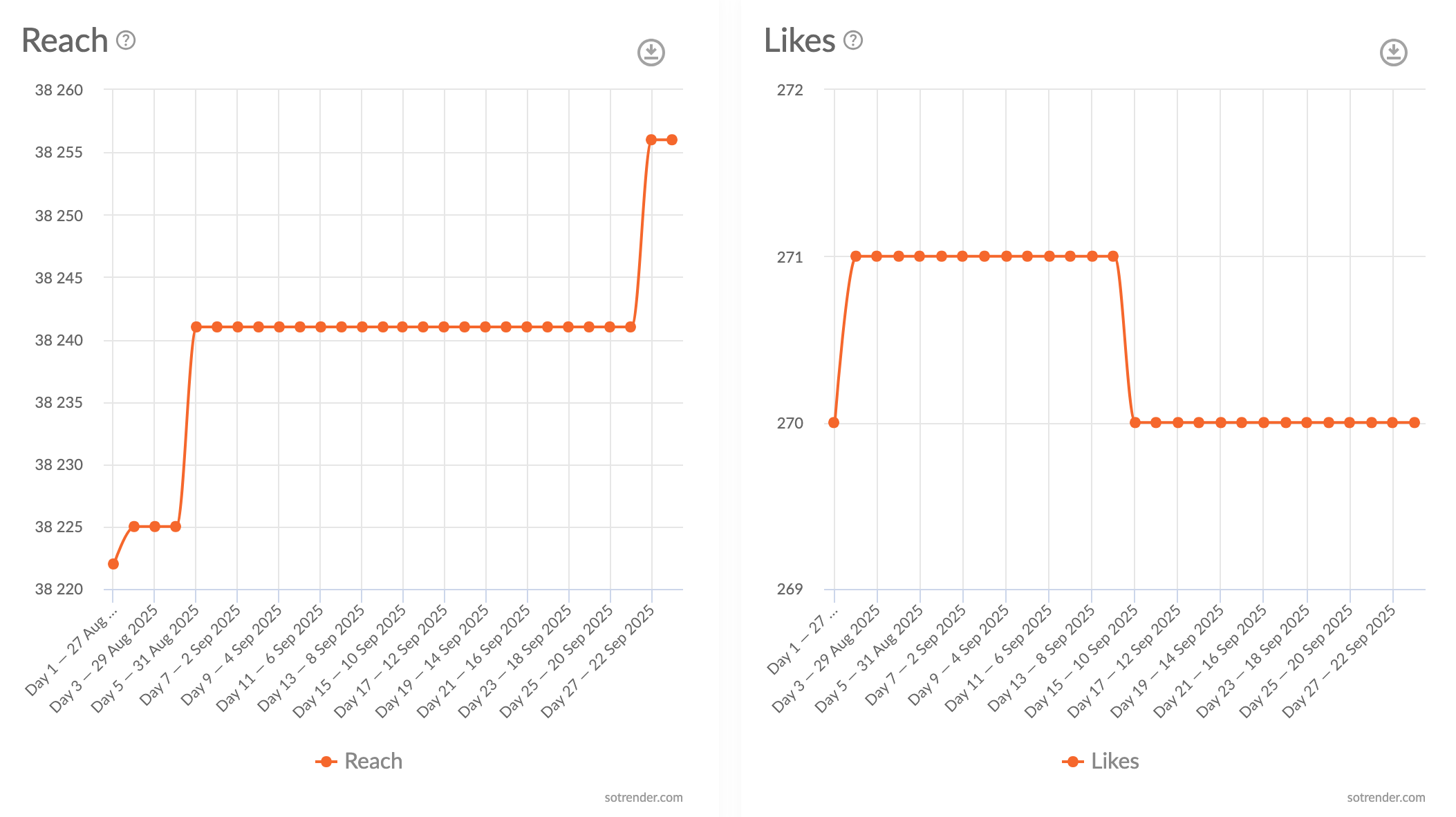
In the time breakdown, you can track metrics such as:
- Reach and views
- Likes, comments, shares, and favorites
- Total and average time watched
- Full video watched
- Video view retention
- When viewers liked the video (down to the second)
- Engagement Rate and Unique Engagement Rate – Unique Engagement Rate shows the real level of viewer engagement (calculated as the ratio of actions to video reach)
- Share Rate and Unique Share Rate – both highlight content with viral potential (the higher the Share Rate, the greater the chance of going viral)
- Activity Index – the higher the index, the more engaging the video, and the greater its chance of achieving better reach
With this type of analysis, you’ll find out how long your TikTok content actually stays alive, whether your videos are reaching new audiences, and what actions viewers take after watching. If some of your videos have a longer lifecycle and stronger retention, it’s worth not only creating more of that type of content but also boosting them with paid campaigns.
- Their views and reach over time
- Sources of video views
- Viewers’ gender and types
See How Many People Watched Your Video to the End – and Where They Discovered It
The new metrics available in detailed post analysis include:
- Percentage of viewers who watched the entire video
- Video retention over time
- The moment viewers liked the video
- Actions viewers took after watching
- Audience demographics (gender, age, country, city, top countries)
- Breakdown of followers vs. non-followers
- Breakdown of new vs. returning viewers
- Sources where viewers discovered your video
You can also analyze data from live videos, including metrics such as top viewer count, to better understand audience engagement and performance during your streams.
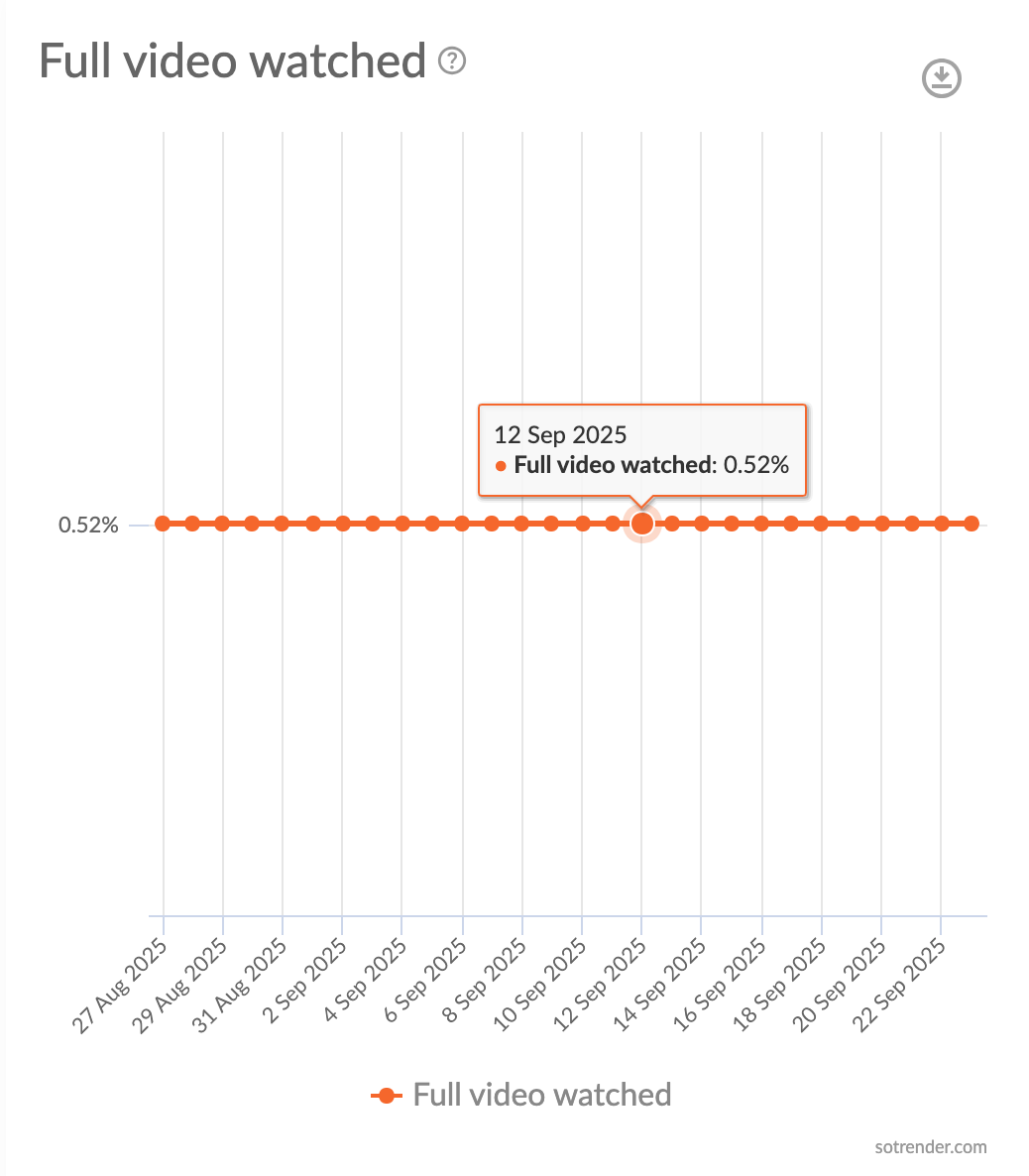
The Full video watched chart shows what percentage of users who started watching on a given day actually made it through to the end. This gives you a clear signal about which videos are the most attractive.
With Video view retention, you’ll see what percentage of viewers kept watching your video at each second of its duration.
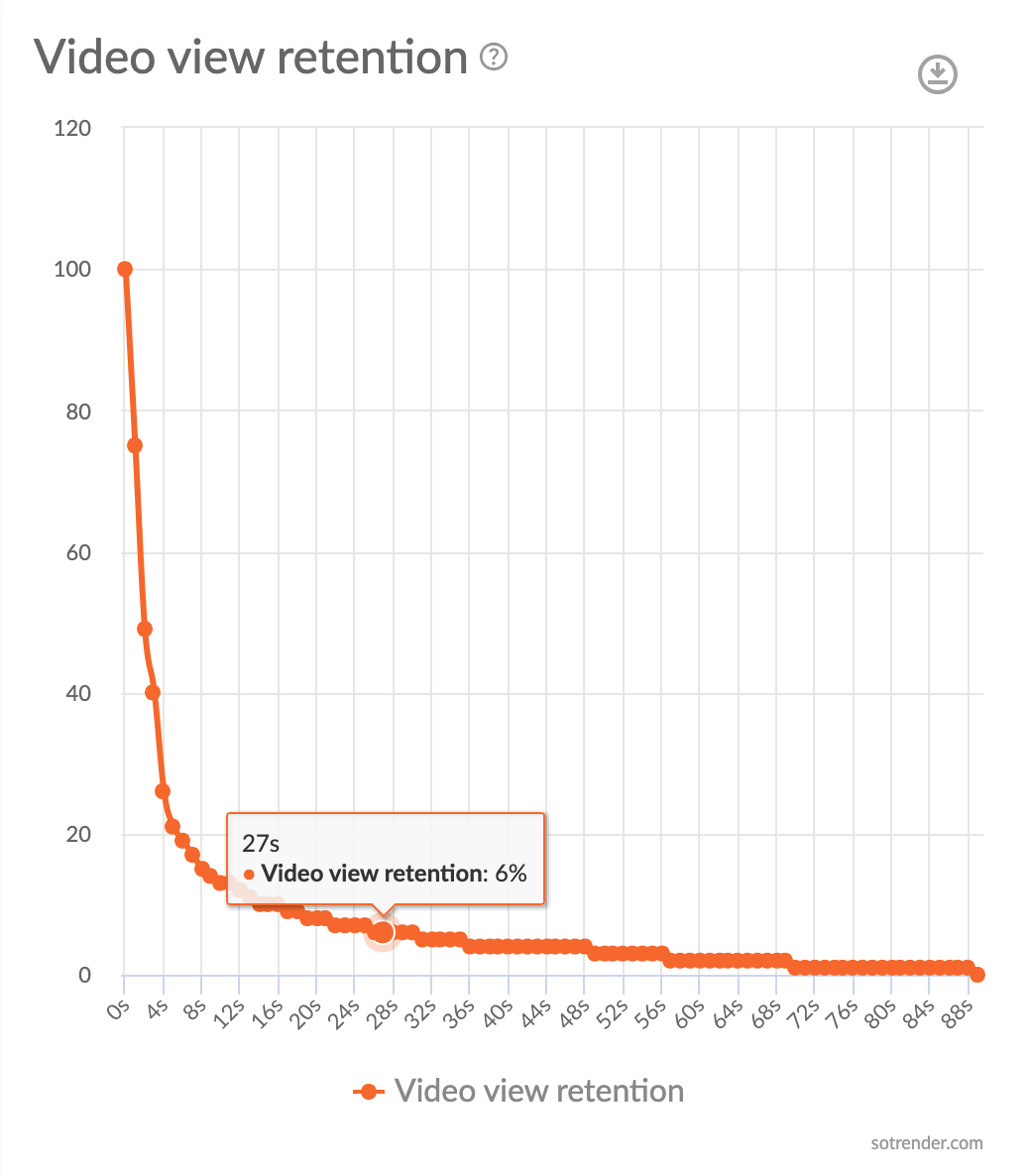
It’s worth remembering that on TikTok, it’s completely normal to see a steep drop in viewers within the first 2–3 seconds of a video.
That said, this metric is still highly valuable for analyzing:
- Whether certain TikToks experience sudden drops in views later on in the video – if so, it might signal that the content at that point stopped being interesting or didn’t meet viewers’ expectations. In such cases, review what was happening in the video at that moment.
- Which TikToks held viewers’ attention the longest, meaning retention stayed at a high level for more time – a clear sign of which videos are most engaging and compelling enough for viewers to keep watching.
All of this will help you:
- Fine-tune your video scripts and editing, knowing which videos or elements grab attention
- Test and improve your intros to make them as engaging as possible and hold attention for longer
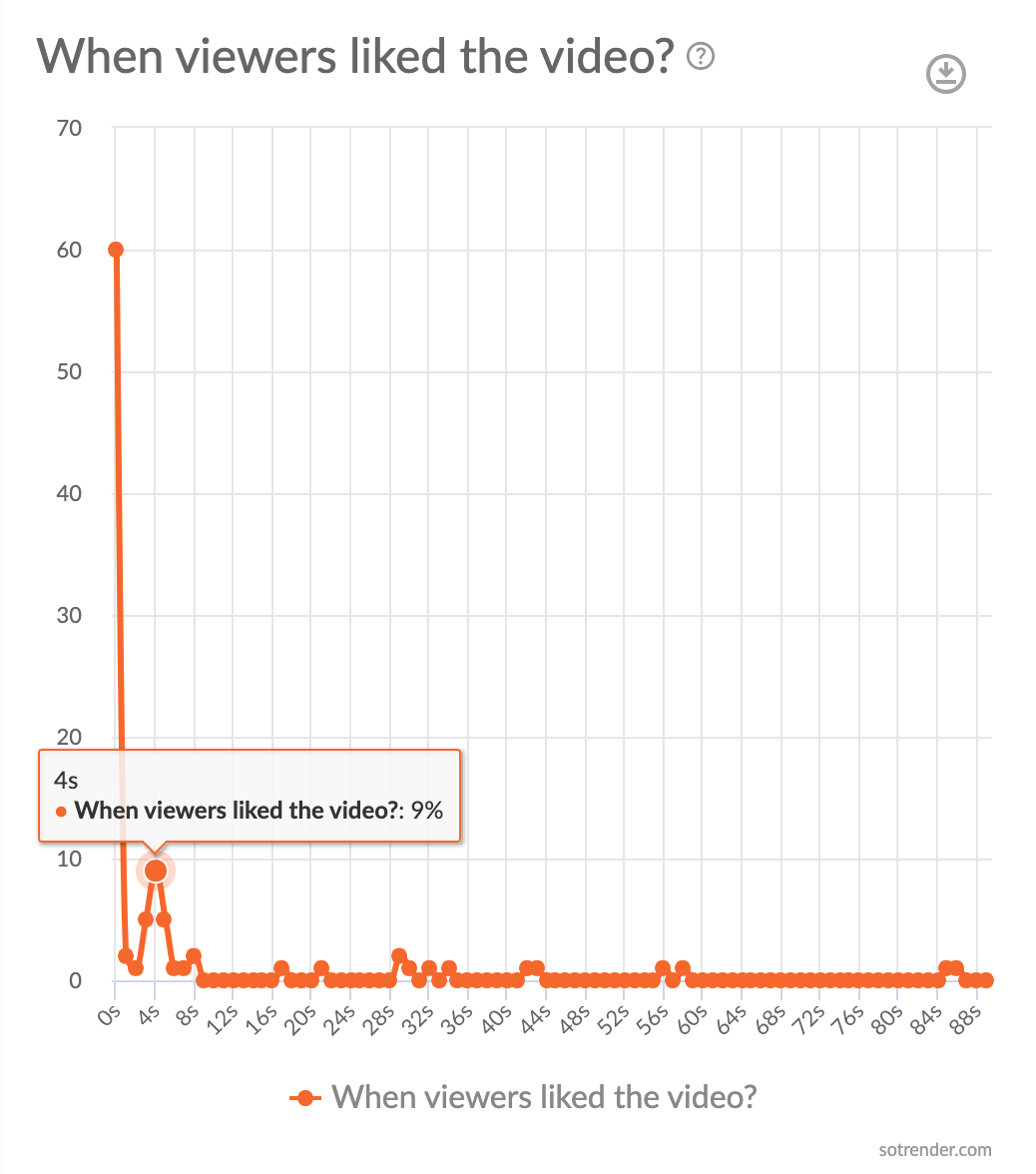
When viewers liked the video is another chart that can add a lot to your strategy. By monitoring the exact second when viewers left a like, you’ll discover what they found most interesting or valuable. This insight is especially useful for creating future content, boosting engagement, and refining the storytelling in your communication.
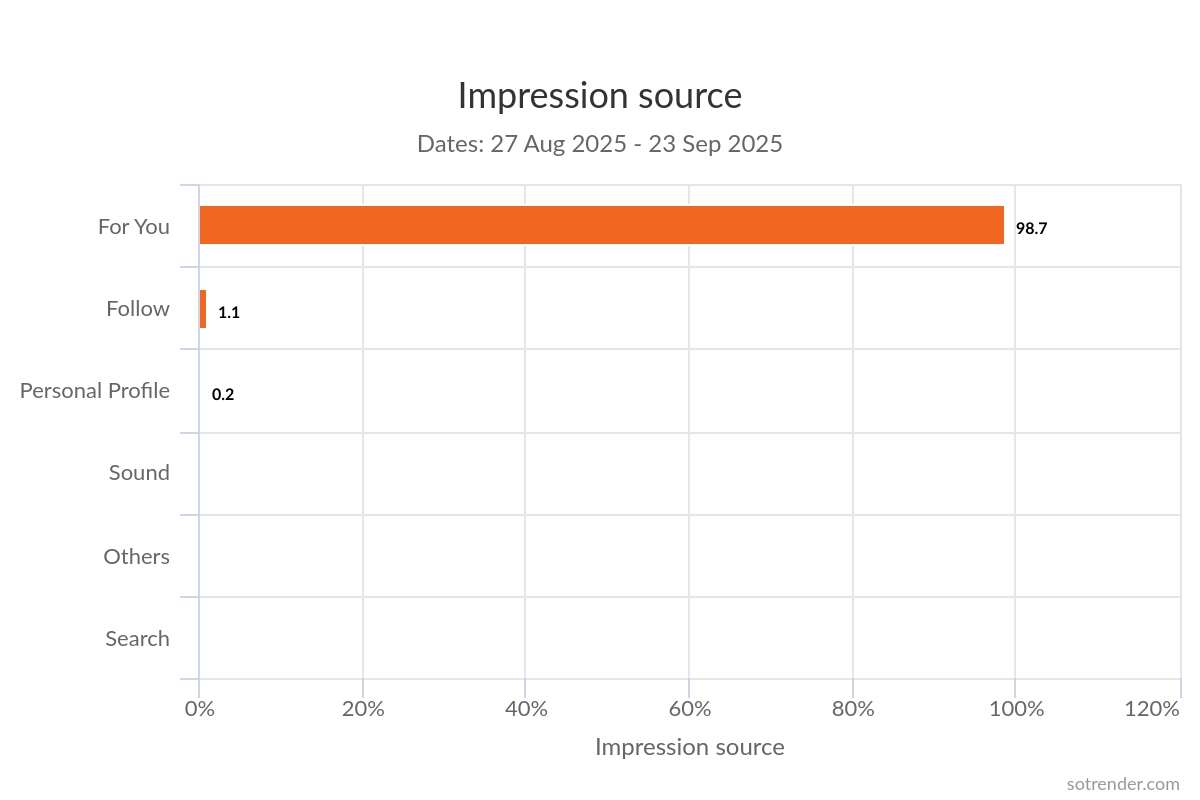
From the detailed post analysis, you’ll also learn where viewers discovered your video. For example, if a large percentage comes from Direct Message, it may indicate that users were eager to share your video with others. If the source is Sound, it means the audio you used was trending at that time.
On TikTok, however, the majority of views usually come from two sources: For You and Search.
Analyze User Activity Around Your Profile
Detailed post analysis also shows what actions viewers took on your profile after watching a given video.
Analyzing when your followers are most active can help you optimize your posting times for better engagement and reach.
You’ll be able to track, among other things:
- How many new followers you gained after publishing the video
- How many profile views came directly from that video
- The number of clicks on your email, address, phone number, or app download link
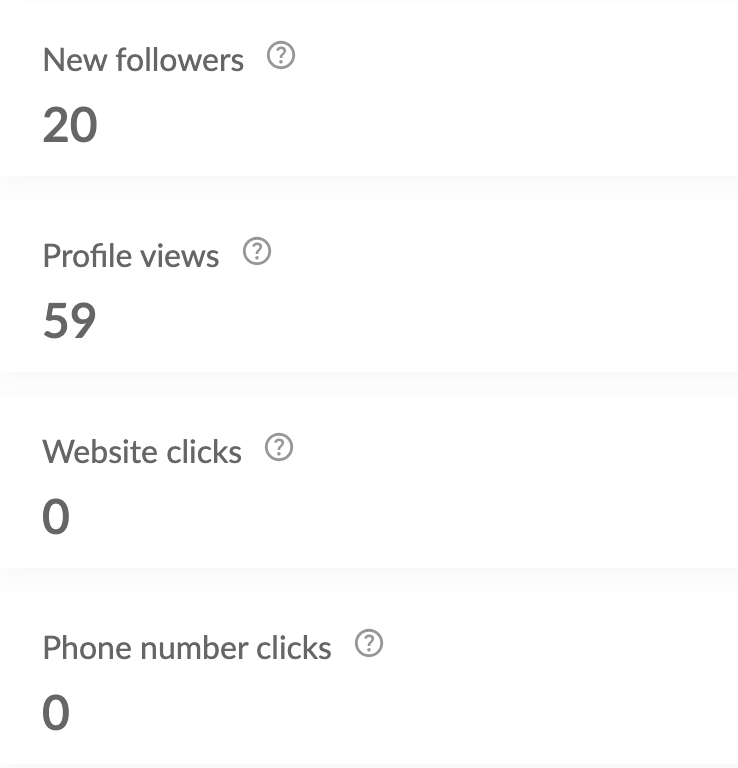
If certain videos brought your brand a lot of new followers, it means they resonated with the TikTok community – and it’s worth publishing more content like that. It also shows whether you’re reaching a wider audience and attracting new viewers, or only engaging your current followers. This is a clear signal of which videos have the potential to break out of your existing bubble.
If, on the other hand, specific videos drove a high number of profile views, it means they encouraged viewers to explore more of your content. Again, that’s a strong sign that those videos were valuable and engaging.
A large number of clicks is proof that you successfully motivated viewers to take action. In that case, analyze which CTAs you used in the videos that generated a lot of clicks on your profile. This way, you’ll identify which videos actually deliver on your business goals – not just rack up views.
Measuring Success: Defining and Tracking Your TikTok Goals
To truly measure your success on TikTok, it’s essential to set clear goals and use analytics data to track your progress. Here’s how to make the most of TikTok analytics for ongoing improvement:
- Identify your objectives: Decide what you want to achieve – whether it’s rapid follower growth, higher engagement rates, or increased website traffic from your TikTok account.
- Set key metrics: Choose the performance metrics that align with your goals, such as engagement rate, net follower growth, or video views.
- Track progress: Use TikTok analytics to monitor these metrics over time. Look for patterns, spikes, or dips that can inform your next steps.
- Analyze insights: Dive into the analytics data to understand what’s working and what isn’t. Use these insights to optimize your content strategy, adjust your posting schedule, and better engage your target audience.
By defining your goals and consistently measuring your results with TikTok analytics, you’ll be able to make informed decisions, maximize your impact, and ensure your content strategy is always moving in the right direction.
Ready to Dive Even Deeper Into Your TikTok Content?
Detailed post analysis is your next step toward better understanding how effective your strategy really is – and how to optimize it.
By knowing how viewers react to your content, how long they watch it, and whether it inspires them to take action, you can refine your future publications – from script to editing – and let go of what doesn’t capture attention as expected.
You can try detailed post analysis anytime with Sotrender’s 7-day free trial.







