

Instagram, with around 3 billion active users, remains one of the most effective ways to communicate with customers. Yet it alone doesn’t help you sell products. You can do it by using this popular social media platform’s tools.
Instagram Reels generate an Engagement Rate of around 0.50% while carousel posts generate approximately 0.55%. A lot depends on you and your immediate responses in the comment section. By reacting fast to prospects’ questions, you can move them down the sales funnel. Yet this is especially challenging for social media managers when they receive tons of messages daily.
Consistency and quick replies on social media are a must for companies striving to stand out. It’s not that easy to achieve when your managers track every comment for each of your campaigns manually. Sometimes high-intent prospects can prefer other businesses because they reply faster. You can solve this problem with automation. When used right, it helps you capture more leads without giving up on the quality and relevance of your answers under comments.
This guide is designed to help you find out more about the automated Instagram comment-reply system. You’ll unveil the strategy behind effective comment automation, how to set up workflows, which triggers and responses work best, how to measure results, and the most common mistakes to avoid.
Why Instagram Comments Are an Underused Lead Source in 2026
Although a lot of brands still underestimate the power of Instagram comments, it doesn’t change their meaning in 2026. Nowadays, they are the most crucial sources of prospects when you use Instagram. You should remember that this social media platform recommends accounts based on meaningful interactions. This means that comments under your Instagram posts have a major influence on your engagement metrics and content distribution, because the Instagram algorithm rewards active comment activity, but generic replies in public comments do little to turn comments into leads. Posts with lots of comments and active discussions become visible to a large audience, resulting in better brand recognition and sales. This is the best way to capture leads organically and engaging with them directly.
When users comment under your posts, it means that they are really interested in your products. This shows that these people have an intent to buy from you. People can ask different questions about available sizes, price, availability, and product features when they are truly interested, which makes each commenter one of your warm leads.
Why is it so important to pay attention to users’ comments and reply to them? Instagram operates on an interest-based content distribution. The platform recommends businesses according to engagement signals. Interactions help Instagram figure out what type of content is suitable for each audience group. It can easily unveil it after exploring the comment activity.
Let’s imagine that you have a sportswear brand. You promote your business on Instagram, create Reels, and various types of content for this social media. You have a lot of comments from prospects asking various questions about price, size availability, color palette, etc. Replying manually isn’t an option, so you take advantage of automation. It helps you answer all comments in seconds and provide relevant information. This allows you not to lose leads and convert them into customers. Over a month, you can bring 200 qualified prospects from just one post. People are satisfied with your brand growth without overloading your team.
Now it’s time to unveil how Instagram comment automation works so that you can decide whether it’s suitable for your company. Let’s dive in.
How Instagram Comment Automation and Instagram DM Automation Actually Work
To take advantage of Instagram automation, you need to clearly understand how it works. It will help you create effective workflows and reply to all of your comments. Automation helps brands manage Instagram post comments and move public comments into a private DM conversation. This way, you can acquire qualified prospects without having to connect your human agent to each conversation.
Comment triggers start the workflow when someone leaves a keyword in post comments. In practice, a comment on an Instagram post kicks off the flow. These might be “price,” “link,” “guide,” “info,” etc. You can configure these keywords with the automation platform you choose. When the system detects a comment, it launches a workflow designed for such a comment.
After finding the right answer, the platform provides a public reply under your post. It’s necessary not only to acknowledge the request but also to create engagement. With its help, your brand can receive a wider reach and higher discoverability based on Instagram’s algorithm. Besides, when prospects see that you are welcoming to users, they might want to comment themselves, which is a positive thing for your business.
Once the platform acknowledges the request publicly, one DM is sent after the trigger, and the DM sent should arrive with a short response time. The message contains the information users ask for: pricing details, product catalog, guide, discount code, link, etc. This is also a great opportunity for your business to directly ask prospects about the product they are interested in or their biggest challenge. That’s how you can figure out whether a person has a high intent to buy.
Conversation in direct messages allows you to collect contact information, provide menu options, and group leads based on their answers. That’s how you qualify prospects and then use different workflows for them. Those with high purchasing intent need to be connected to sales representatives, while less qualified prospects need an automated nurture sequence with different types of content.
However, it’s important to remember that Instagram’s rules require businesses to initiate conversations only after users take an action first. It can be a comment under your post or a direct message. Only after that, with Meta’s official API, your business can start an automated DM interaction and keep your Instagram account and account safe; responding within 15 minutes increases conversion intent by over 80%. Besides, you have a 24-hour messaging window after the user’s most recent interaction. To prevent your brand from having reputation issues, it’s always better to review the latest requirements before incorporating automation so that you comply with Meta.
Now that you know how Instagram comment automation works and how you can use it while complying with Instagram requirements, it’s time to proceed to setting up your first flow. In the next section, we’ll discuss step by step your first comment-to-lead workflow.
Setting Up Your First Comment-to-Lead Workflow (Step-by-Step)
After figuring out how Instagram comment automation works, the next thing you should do is to explore how to set it up for your business needs. We’ll show you how to do it without any special skills or knowledge. You’ll find a short and clear step-by-step guide below.
1. Identify your perfect solution
To automate your Instagram comments, you need to have a special platform, and in a no-code tool setup can take under 2 minutes. It should meet your budget, cover the key features you need, and be user-friendly. Moreover, if you don’t have any coding skills, the service you choose should have a visual editor. SendPulse is one of these platforms. Its Instagram comment automation builder enables you to build comment-triggered automations replying to comments, sending personalized DMs, and walking users through branching conversations with Instagram DM automation and DM automation through Meta’s official environment. The platform also offers you the opportunity to connect to its CRM to have all your prospects’ data stored securely in a single place, while a Meta tech provider helps manage automation securely.
2. Choose the right post
Your main task here is to choose an Instagram post with a clear intent and a specific offer. The best formats for driving engagement are educational carousel posts, product reveal posts, promotional Reels, case studies, tutorials, and even selected feed posts, but keep the CTA conversational rather than pushy so followers are more likely to comment for more details.
3. Focus on identifying your trigger keyword
This is the word that will start the workflow. It should be short and simple. Usually, these are words: price, demo, guide, join, checklist, and others. They are easy to type and remember. As an option, when you have a couple of keywords with the same meaning on your mind, consider testing them. Some users might react better to the keyword “demo,” while others would prefer “trial.” Everything depends on your product and audience. After testing, choose the top-performing one.
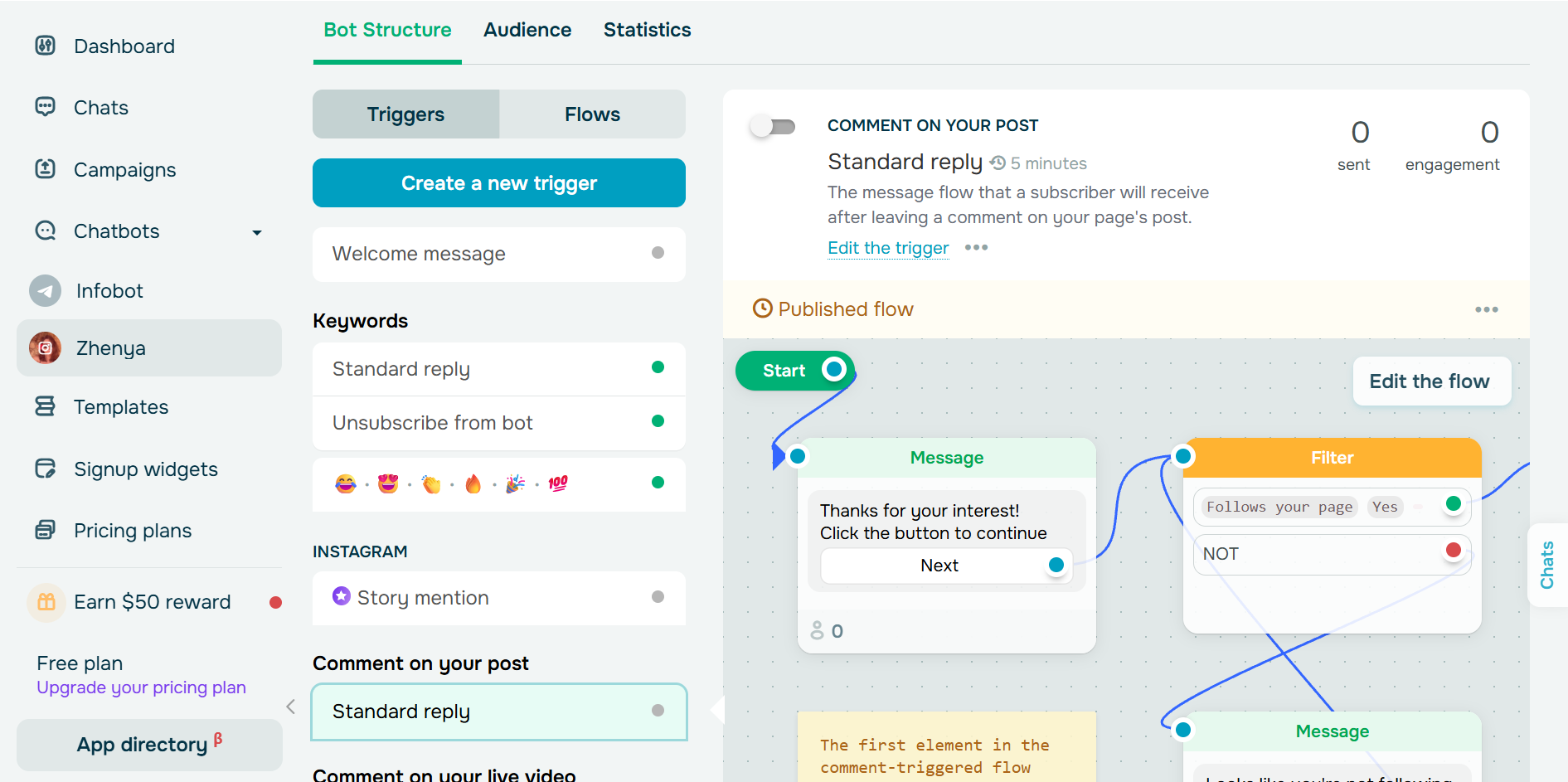
4. Create a public reply
You should always acknowledge that you notice every user’s comment with a public response, and that message can be an auto reply that acknowledges the commenter before moving them to DMs. That’s how you establish engagement and let users know that they’ll receive their answers, content, registration links, discount codes, etc. When writing replies for your automation, ensure that they are short and friendly. They should also stick to your brand voice. The examples might include: “I’m on the way,” “Check your DMs,” “Just messaged you,” and many others, ideally making it clear they should check their Instagram inbox. If you want to make your prospects feel that human agents reply to them, you can use multiple reply variations. It’s especially useful when you have lots of comments under your posts. Your answers will feel less robotic.
5. Create the DM flow
This is where you need to think about the conversations you are going to have with your potential customers, because this is the core of DM marketing. Start with a personalized greeting and then proceed to providing the value mentioned in your post. Deliver your guide, pricing information, research, webinar link, or product catalog as soon as possible. Instagram DMs often see around a 90% open rate and about a 60% reply rate, so immediate delivery matters. It will help you prevent a drop-off. After that, consider asking a qualifying question, “Which product or service are you interested in?” or some other questions, helping you find out if these users have a real interest in your product. Their responses will define which workflow your automation is going to use next, with intent detection helping guide the next step in the conversation. It will result in a more relevant conversation, bringing value to your prospects and sales for your business, whether that means a direct next step or follow-up messages.
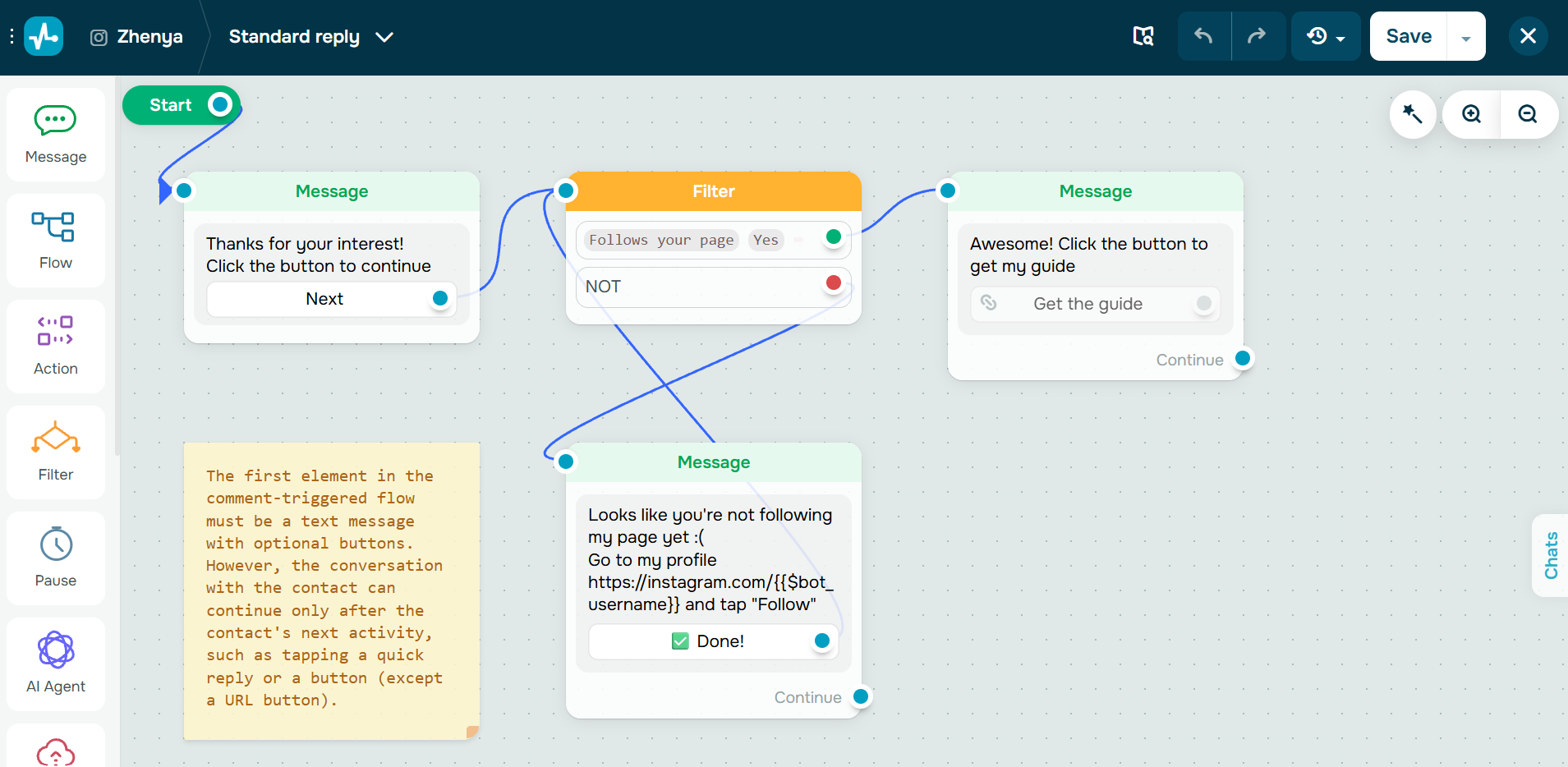
6. Include a lead capture
After interacting with potential customers in DMs, you need to send a lead capture step where you capture leads and begin email collection. Button-based menus will make it so much easier for users to provide their contact details and for you to collect them. The flow can also collect emails and send people to a dedicated landing page when the offer needs more detail. When you integrate your automation platform with a CRM, your collected data automatically goes to your CRM. It lets you nurture prospects not only on Instagram but also on other marketing channels they use. When you use a service like SendPulse, it’s very easy because you have all the crucial tools in one place, and the username plus contact details from email collection can be stored in the CRM.
Now that you know how to set up your first automation without having to code, it’s time to explore five comment automation workflows that are especially relevant for 2026. Let’s dive in.
Five Comment Automation Workflows That Convert in 2026
The aim of each comment automation isn’t simply to generate engagement but to turn Instagram comments into leads through Instagram comment automation and reach specific business goals. These might include sales, qualified leads, registrations, etc. There are certain comment automation workflows that perform better than others. We’ll unveil them in this section. It will help you start right and reach your goals faster.
- Lead magnet delivery. This type is suitable for B2B companies, agencies, consultants, SaaS brands, and coaches. You can use a trigger word, “guide,” so that users can receive a free checklist, template, or ebook in their direct messages after they comment on your post. Usually, 20–40% of users who type the keyword continue to direct messages, and around 10–25% provide their contact details. Some offers can work even without a dedicated website path, though stronger funnels often link to a website later. However, to achieve such results, you need to provide real value to users and help them solve their problems.
- Event registration. If you want to host a webinar, workshop, product launch, or virtual event, you can use the trigger word “join.” It will help potential attendees register for the event. Yet, besides automating the registration process, you should also take care of the reminders. That’s the most effective way to increase attendance rates.
- Discount code distribution. When you are engaged in retail, beauty, fashion, or fitness and want to provide customers with a discount, consider using the “15off” trigger. It will encourage new prospects to purchase from you. Remember, running discount campaigns too often isn’t good for the perceived value of your brand, and comment-to-lead campaigns shouldn’t be overused either, or followers may feel overwhelmed.
- Product information requests. If users want to get information about the full pricing breakdown, you can let them use the trigger “price” in the comments under a specific post. Your automation will later deliver pricing details, product specifications, FAQs, and, when appropriate, product links in the DM to purchase or book a demo. This is a perfect solution for ecommerce companies, software businesses, online services, and subscription-based companies. However, avoid overwhelming users with too much information at once. It’s better to set everything up so that prospects can request the needed information later. Use buttons and quick replies for this purpose.
- Quiz and qualification funnel. This one is about finding the perfect product for your customers. Users can comment “quiz” under your post and answer qualifying questions. That’s how they can find their perfect match. When creating questions, ensure that they aren’t too long. Three to five questions are enough to understand what people need.
Now that you know the high-converting workflows, it’s time to unveil how you can evaluate the performance of your workflows. We’ll cover the most crucial metrics in the section below.
How to Measure What’s Working
After launching comment automation, it’s a must to keep an eye on performance and track results over time. It’s possible to ensure a seamless experience for users when you assess the most crucial metrics. We’ll cover them for you here.
- Comment-to-DM rate. This metric refers to the percentage of people who receive and engage with the automated DMs after leaving a comment under your post, showing how smoothly the commenter moves from comment to DM. You can reach 60-80% engagement rates if your CTA is clear and your offer is relevant to these users. A lower rate might indicate that your offer isn’t too valuable for prospects or that a keyword isn’t right for your product.
- DM-to-lead conversion rate. It’s a percentage of people who, during your DM flow, share their contact details, register for your webinar, book a demo, connect with your sales representative, or take another desired action. Usually, a rate of 15-25% is considered a good one.
- Cost per lead. This applies when you promote your posts with paid ads. After comparing this metric across different formats, offers, and workflows, you’ll be able to identify the high-performing ones. Later, you can focus on creating similar posts.
- Time-to-first-response. With automation, you can send instant responses to users’ comments. When they have to wait for too long, it might negatively impact conversion rates.
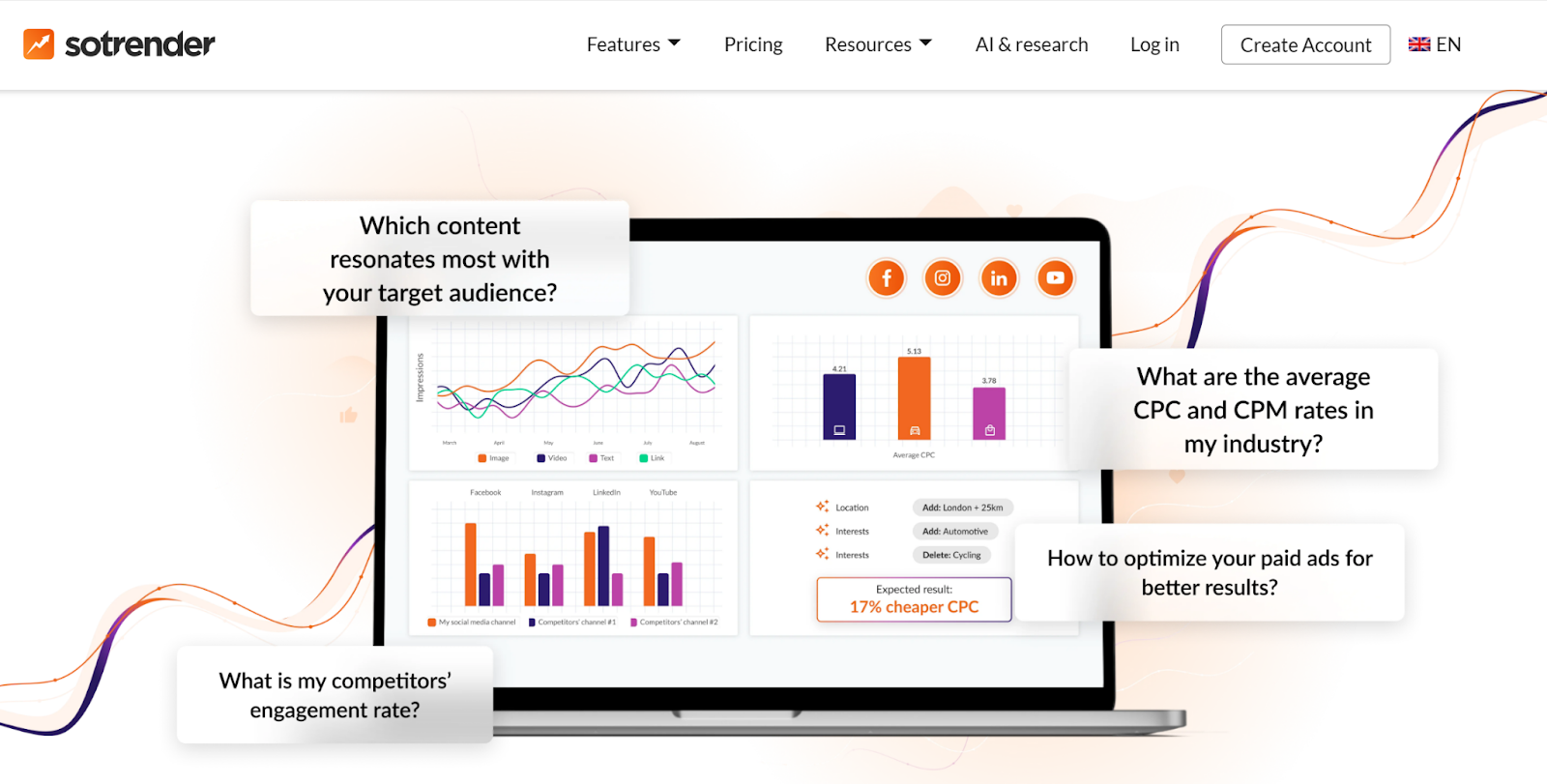
Besides metrics, special platforms allow you to evaluate the performance. With native Instagram Insights, you can access engagement data, including profile activity, reach, and comments. When you use a chatbot platform, it usually provides you with workflow analytics, which covers DM open rates, conversion tracking, and button clicks. You can also take advantage of social media analytics tools like Sotrender. They enable you to understand which posts generate the highest quality comment activity, evaluate content performance, unveil audience engagement, and much more.
Now that you know the metrics, it’s time to move to the mistakes that might negatively influence your comment automation. This information is important because it allows you to avoid specific challenges.
Five Mistakes That Kill Your Comment Automation
You can create effective comment automation, but there still might be mistakes that you have to avoid. We’ll mention them below. Handling comments manually is time-consuming, while automation can be set up in under 2 minutes and may save up to 10 hours weekly, so we hope you treat it as a practical way to scale.
- Over-automating conversations. Although automation helps your business a lot, you still need to remember that it can’t fully replace human interaction. Automation should handle the first moment efficiently, but when there are leads who have an intent to buy, you should route them to your sales reps as soon as possible. Having robotic, unnatural answers might cause prospects to lose trust.
- Using vague trigger keywords. It’s important to have clear keywords that tell you about user intent. It is always better to use words like “guide,” “demo,” “price” rather than “yes” or “ok.” This way, you’ll be able to bring more qualified leads to your brand and make it easier for your team to assess your campaign performance.
- Never A/B testing. Business owners make a mistake when they launch automation but never take care of its optimization. Sometimes even small changes can bring you better results. Revising your comment prompts, reply messages, DM openers, and qualifying questions over time is a must. It might result in higher conversion rates and customer satisfaction.
- Forgetting the handoff option. Of course, automation allows you to generate prospects. But to close deals, you still need a real person. Ensure that you have a sales representative for high-intent prospects. This professional will help you close deals faster.
- Ignoring Meta’s 24-hour messaging window. Always comply with Meta’s requirements on how and when you can text users. When you violate these rules, you can later face compliance issues and missed follow-up opportunities.
Conclusion
Instagram comments are not only a way of engagement but also an effective lead generation channel, especially when it comes to Instagram. The platform organically promotes posts that have high comment activity. After choosing the right automation platform, you’ll be able to provide instant answers and encourage users to convert into customers. Besides providing them with valuable content, you’ll be able to collect contact details and promote your products effectively.
You should always comply with Meta’s requirements and regulations. This way, you’ll be able to smoothly communicate with your leads without hurting your reputation. With a platform like SendPulse, you’ll be able to not only automate your communication but also collect and store customer information. After launching your comment automation, you have to evaluate its performance – just like you analyze your overall Instagram performance.