Yes, and no. 😉
As you most probably know, you have access to your Instagram Insights only from your mobile app, and once you switch your profile to a business or creator account. To access Instagram Insights, you need to switch account type to a business account, which unlocks analytics and other features designed for companies and brands. The Instagram mobile app is the primary way to access these insights.
However, there is now a way to see your Instagram data from a desktop device – via Meta Business Suite. Instagram Insights are available through the Instagram mobile app for business accounts, but Meta Business Suite allows users to access Instagram Insights, making it particularly useful for business profiles. Alternatively, there are also external tools that can aggregate and present your Instagram data.
Instagram Insights – what are they?
Instagram Insights, if you’re not familiar with this term, provide different metrics about your Instagram account, such as reach, impressions, and engagement actions, to help you understand how your profile is performing.
As we can read on the official Instagram website:
You can use Instagram insights to learn more about overall trends across your followers and your content’s performance with your audience. (…) Insights are free and available only for business or creator accounts. You can view insights from your profile in the Instagram App.
You can access insights from your profile page by tapping your profile picture in the right hand corner of the app. The hamburger icon in the top-right corner of the profile page provides access to settings and insights.
Instagram Insights offer detailed information about your content’s performance, including different metrics and analytics that help you optimize your strategy.
As you can see, accessing Instagram Insights is possible only from the mobile app.
However, there are now ways to see all those data from a desktop device. Even though actually, you’ll no longer be accessing Instagram Insights, you’ll be able to see the exact same data (or in some cases even some more data).
Instagram Insights features
Instagram Insights offers a treasure trove of features that can help businesses and creators keep a close eye on their performance. The Insights Overview provides a summary of key metrics, making it easy to analyze your account at a glance. Here’s a breakdown of what you can expect:
- Account Insights: This feature gives you a bird’s-eye view of your Instagram account’s performance. You can track metrics like total followers, unique accounts reached, engagement rate, reach, most engagement, active times, and audience growth, helping you understand how well your content is doing overall.
- Content Insights: Dive deeper into the performance of specific posts, individual post analytics, stories, and reels. You can tap view insights for each post to analyze how your content performs and review content’s performance metrics such as engagement, reach, and interactions. This allows you to see which pieces of content are hitting the mark and optimize for the most engagement.
- Audience Insights: Get to know your followers better with Audience Insights. This feature provides valuable information about your audience’s demographics, including age ranges, age range, gender breakdown, top locations, top countries, and top cities, as well as their interests and behaviors, helping you tailor your content to their preferences.
- Stories Insights: Instagram Stories are a great way to engage with your audience, and Stories Insights show you how well they’re performing. Track metrics like users view, number of times a story is viewed, replies, saves, next story taps, and audience’s interest to see what resonates with your viewers.
- Reels Insights: Reels are all the rage, and with Reels Insights, you can track metrics like watch time, average watch time, points of exit, multiple views, and the number of times a reel is watched. This helps you understand how engaging your reels are and where you might need to tweak your content.
- Profile Interactions Insights: This feature shows you metrics for interactions on your profile, including likes, comments, saves, shares, website taps, business address taps, link clicks, and overall profile activity. It’s a great way to see how people are engaging with your overall Instagram presence.
- Live Videos Insights: For live videos, you can track metrics such as comments, shares, reach, peak concurrent viewers, and interactions to understand audience engagement during your live broadcasts.
By leveraging these features, you can gain a comprehensive understanding of your Instagram performance and make data-driven decisions to improve your strategy.
Understanding Account Type and Insights
To unlock the full potential of Instagram Insights, it’s important to understand how your account type affects the analytics and tools available to you. Only business accounts and creator accounts—collectively known as professional accounts—have access to in-depth analytics and the Professional Dashboard. If you’re still using a personal account, consider switching to a business or creator account to access instagram insights and take advantage of advanced features.
With a professional account, you can view detailed account insights, including top posts, reach, engagement, and audience demographics. The Professional Dashboard provides a convenient summary of your account’s performance, making it easier to monitor your progress and adjust your content strategy. You’ll also gain access to tools designed specifically for businesses and creators, such as promotional options and contact buttons on your instagram profile.
Understanding your account type and the insights it unlocks allows you to make informed decisions about your content and marketing efforts. Whether you’re a business looking to grow your brand or a creator aiming to expand your reach, using the right account type ensures you have the analytics and tools you need to succeed on Instagram.
How to access Instagram Insights from a desktop device
In order to have the possibility to view Instagram Insights from a desktop device, you first need to connect your Instagram Business Profile (or Creator Profile) to a Facebook Page. You can access these insights using Meta Business Suite or third-party tools.
Once you do this, just go to Meta Business Suite, navigate from your profile page, choose the Insights tab from the menu on the left and then select Instagram at the top of the page. Meta Business Suite allows you to view Instagram analytics and a variety of metrics, providing insights on activity and audience metrics.
If you’re wondering what Meta Business Suite is, it’s a comprehensive platform developed by Meta (formerly Facebook) that enables businesses to manage and analyze their Facebook and Instagram content. It offers tools for publishing, scheduling, and performance analysis, all within a unified interface.
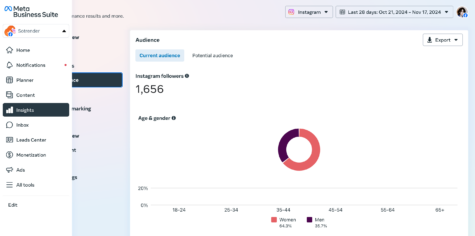
How to access Instagram Insights from a desktop
You’ll see all the same data that you see on the mobile app. The only difference is that the data will be presented in a slightly different view. You can also select a time period for which you want to see your insights, e.g. this month, last 28 days, last 7 days etc.
Even though the desktop version may make it easier and more convenient to view and analyze your data, for many marketers and professionals, it’s still not a perfect way of understanding their performance.
Analyzing Instagram data on a desktop in a more convenient way
We totally understand if you prefer to analyze your Instagram metrics on a desktop rather than on a limited mobile screen. It’s completely understandable also if you feel that what Instagram Insights has to offer for your Instagram account is not enough for you.
Apart from using Meta Business Suite, you can also take advantage of external social media analytical apps that are available on the market to access Instagram analytics. These tools provide access to different metrics and more detailed information, such as post performance, engagement metrics, and user demographics. Additionally, analyzing Instagram stories metrics can provide valuable insights into audience engagement and help refine your posting strategies.
One of them, which you may or may not have heard of, is Sotrender.
Sotrender helps to analyze Instagram performance in a longer time period, understand audience interests and behaviors better, but also generate comprehensive reports. It also allows you to analyze the behavior of Instagram users who view and interact with your content.
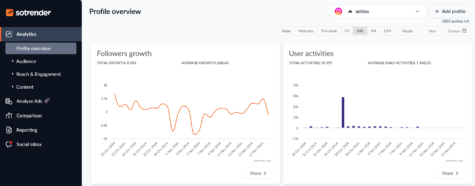
Analyzing Instagram insights on a desktop in Sotrender
Another key difference, and advantage of using Sotrender, is that within one tool you get both insights about your organic, and paid, performance, meaning also about your ads. In Instagram Insights on your mobile device, you will see some metrics about your ads performance, however, they are mixed with organic results. You’ll definitely lack some crucial information about your ads specifically.
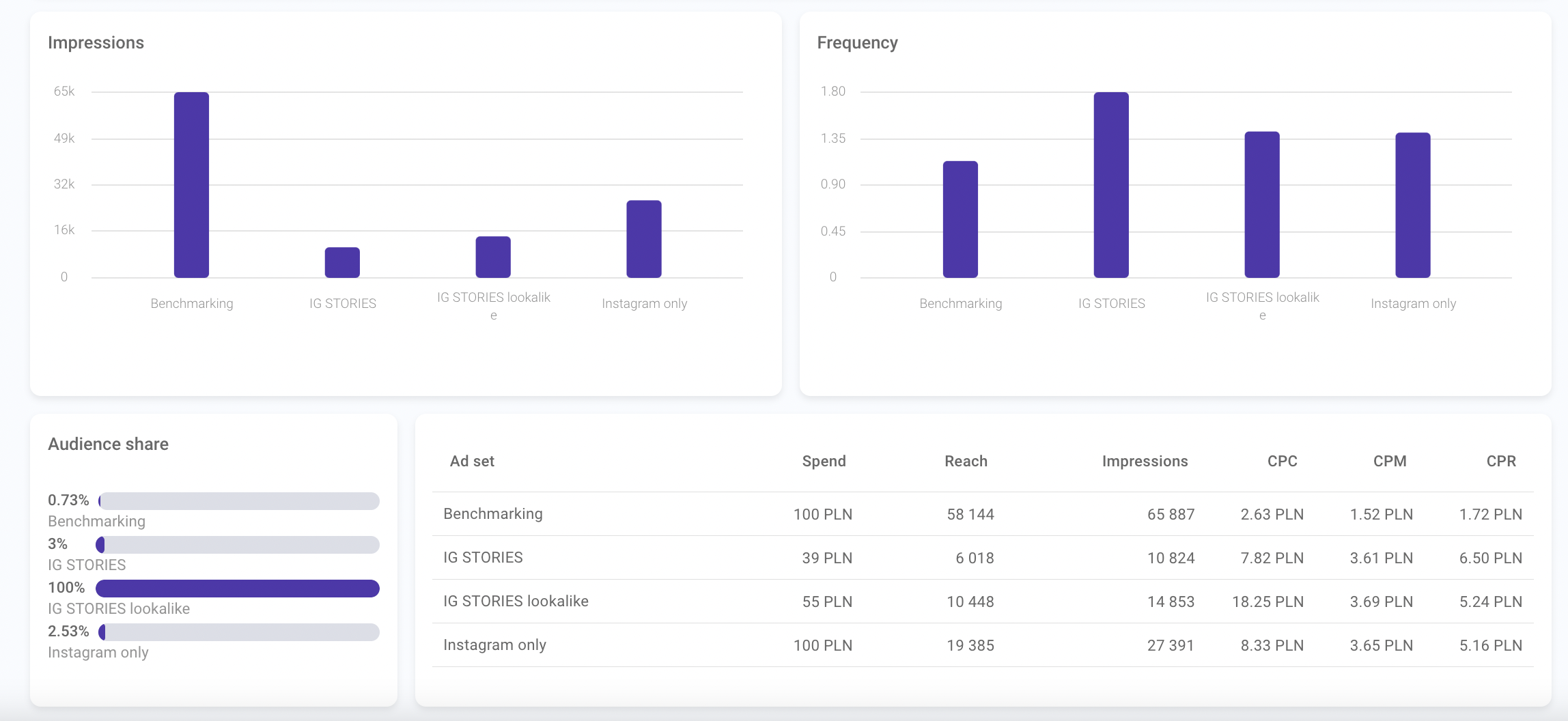
Analyzing paid Instagram Insights in Sotrender
In Sotrender you will see plenty of ads-related metrics like reach, impressions, CPM, CPC, audience share, sentiment, and many more.

Sotrender offers a 7-day free trial so you can easily test it anytime to see if it fits your needs and offers the data that you are actually looking for.
Using date range to track progress
One of the most powerful features of the Instagram insights section is the ability to select a custom date range when analyzing your account’s performance. This tool allows you to track your progress over a specific period, whether you want to review your results from the past week, month, or a custom time frame that aligns with your latest campaign.
By leveraging the date range feature, you can dive into your account insights and see how your Instagram marketing strategy is performing over time. For example, you can monitor how many accounts you’ve reached, how many accounts engaged with your content, and how many profile visits you’ve received during a particular period. This makes it easy to spot trends, such as spikes in engagement after a new content launch or steady growth in profile visits following a change in your posting schedule.
Analyzing these insights over different date ranges helps you identify what’s working and what needs adjustment in your content strategy. Whether you’re aiming for more accounts reached or higher engagement, tracking your data over time is essential for achieving Instagram success. Use these insights to refine your approach, optimize your posting times, and ensure your content resonates with your audience.
Tips for using Instagram Insights
To truly maximize the benefits of Instagram insights, it’s important to use the platform’s analytics strategically. Here are some practical tips to help you get the most out of your data:
- Check your insights regularly: Make it a habit to review your account’s performance on a consistent basis. This helps you stay aware of what’s working and where there’s room for improvement.
- Utilize the date range feature: Analyze your progress over different time periods to spot trends and measure the impact of changes in your content strategy. Comparing data from various date ranges can reveal valuable insights about your audience’s behavior.
- Focus on engagement metrics: Pay close attention to accounts engaged and content interactions. These metrics show how your audience is responding to your posts and stories, helping you understand what content sparks the most interest.
- Let data guide your content strategy: Use the insights you gather to inform your future content decisions. If certain types of posts or stories consistently perform well, consider incorporating more of that content into your instagram marketing strategy.
- Experiment and adapt: Don’t be afraid to try new content formats or posting times based on your insights. Use the data to test different approaches and refine your strategy for even better results.
By following these tips and making data-driven decisions, you can optimize your Instagram presence, boost engagement, and drive greater success for your account.
Using Instagram Insights to improve performance
Instagram Insights isn’t just about numbers; it’s about using those numbers to boost your performance on the platform. Here’s how you can make the most out of your Instagram Insights:
- Track engagement: Keep an eye on engagement metrics like likes, comments, and saves. Aim for the most engagement by posting when your audience is most active. Analyze which posts attract non followers as well as your current followers, as this can help expand your reach and grow your audience.
- Analyze content performance: Use Instagram Insights to dive into the performance of individual posts, stories, and reels. Look at which content pieces are performing well and which aren’t. Adjust your content strategy based on these insights to keep your audience engaged.
- Monitor account growth: Track your account’s growth by looking at how many followers you have and monitoring new followers over time. If you notice a spike in new followers or reach, analyze what you did differently during that period and try to replicate it.
- Identify audience interests: Use Audience Insights to understand your audience’s interest, including your followers’ interests and behaviors. Create content that aligns with their preferences to keep them engaged and coming back for more.
- Adjust your content strategy: Based on the data you gather from Instagram Insights, tweak your content strategy. Experiment with new content types and formats to see what works best. Don’t be afraid to try something new and see how your audience responds.
By regularly checking Instagram Insights and adjusting your strategy accordingly, you can improve your engagement, reach, and overall performance on the platform.
Instagram Insights, Facebook platforms, or an external app?
There is no good answer whether you should use free Instagram Insights on your mobile device, Meta Business Suite on your desktop or an external app. Using all of these platforms will provide you with a lot of valuable metrics. However one should be aware of some limitations that these platforms have. It’s your decision which one you’d go for. 🙂
Usually, once becoming more professional, the need of having more in-depth data is also increasing. It’s natural to start with Instagram Insights – and for a beginner that would be a lot of information to process already! However, as time passes by, we’re pretty sure that your needs will evolve, and eventually, you will go for some paid solutions. 🙂

Author
Klaudia Żyłka

Marketing Team Lead
Instagram, dogs, books and food lover. Former student at Warsaw University and Malmö University. Improving her marketing skills every day. Proud owner of DIMAQ certificate







